


Page 28 - Digital_Kids_3
P. 28
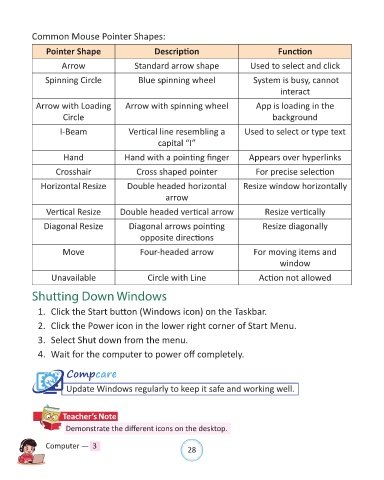
Common Mouse Pointer Shapes:

                 Pointer Shape                       Description                               Function

                      Arrow                   Standard arrow shape                   Used to select and click


                Spinning Circle                 Blue spinning wheel                    System is busy, cannot
                                                                                                interact

             Arrow with Loading            Arrow with spinning wheel                   App is loading in the
                      Circle                                                                 background

                     I-Beam                 Vertical line resembling a              Used to select or type text

                                                      capital “I”

                      Hand                 Hand with a pointing finger               Appears over hyperlinks

                    Crosshair                  Cross shaped pointer                    For precise selection

               Horizontal Resize            Double headed horizontal               Resize window horizontally
                                                         arrow

                 Vertical Resize          Double headed vertical arrow                    Resize vertically

                Diagonal Resize              Diagonal arrows pointing                     Resize diagonally

                                                opposite directions

                      Move                      Four-headed arrow                      For moving items and
                                                                                               window

                  Unavailable                      Circle with Line                     Action not allowed


              Shutting Down Windows

              1.  Click the Start button (Windows icon) on the Taskbar.

              2.  Click the Power icon in the lower right corner of Start Menu.

              3.  Select Shut down from the menu.

              4.  Wait for the computer to power off completely.


                       Compcare

                       Update Windows regularly to keep it safe and working well.


                      Teacher’s Note

                       Demonstrate the different icons on the desktop.


                Computer —  3                                   28

