


Page 41 - Digital_Kids_3
P. 41
5                                          Tux Paint


                                     Chapter Outline

                                                     Introduction to Tux Paint
                                                     Components of Tux Paint Window
                                                     Tools of Tux Paint


            Introduction of Tux Paint


            Tux  Paint  is  a  free,  open-source  drawing  program  designed  specifically  for
            young children (ages 3 to 12). It provides a fun, easy-to-use interface with large

            buttons, sound effects, and helpful cartoon characters like Tux the Penguin,
            who offers tips and guidance.

            Tux  Paint  includes  tools  for  drawing,  coloring,  adding  shapes,  stamps,  and

            special effects, making it ideal for creative learning. It runs on various operating
            systems, including Windows, macOS, and Linux.


            Starting Tux Paint

            To start Tux Paint in Windows 11:

            Start button → Tux Paint → Tux Paint (full screen)

            When you start the program, the Tux Paint window opens on your monitor
            screen.


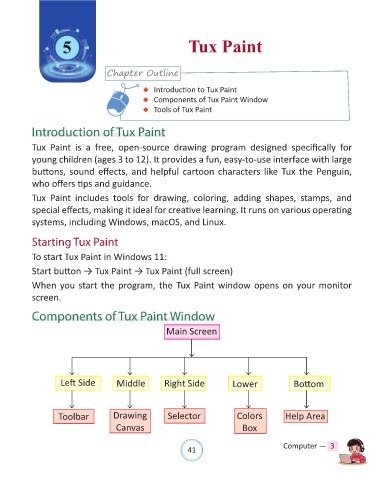
            Components of Tux Paint Window

                                                         Main Screen


                     Left Side          Middle          Right Side              Lower               Bottom


                     Toolbar           Drawing            Selector               Colors          Help Area

                                        Canvas                                     Box


                                                                41                               Computer —  3

