


Page 57 - Digital_Kids_3
P. 57
7                                     MSW LOGO


                                     Chapter Outline

                                                     Logo Screen              MSW Logo Window
                                                     Commander Window
                                                     MSW Logo Commands


            Logo Screen

            In MSW Logo, the screen is typically divided into two main parts:

              1.  Drawing Canvas

              2.  Commander Window


            MSW LOGO Window

            Drawing Canvas                                                    The original Logo used a real

            The Drawing Canvas in  MSW  Logo is the                          robot turtle on the floor that

            white area or screen  where  drawings  and                         moved around with a pen,
            shapes appear. It is the space  where  the                       drawing lines on paper. MSW

            turtle moves and draws pictures when we                            Logo later turned it into an
            give it commands.                                                         on-screen turtle.


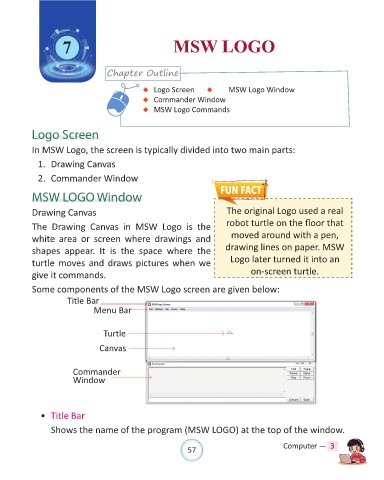
            Some components of the MSW Logo screen are given below:
                        Title Bar
                                 Menu Bar


                                    Turtle

                                   Canvas


                          Commander
                          Window


              •  Title Bar

                  Shows the name of the program (MSW LOGO) at the top of the window.


                                                                57                               Computer —  3

