


Page 58 - Digital_Kids_3
P. 58
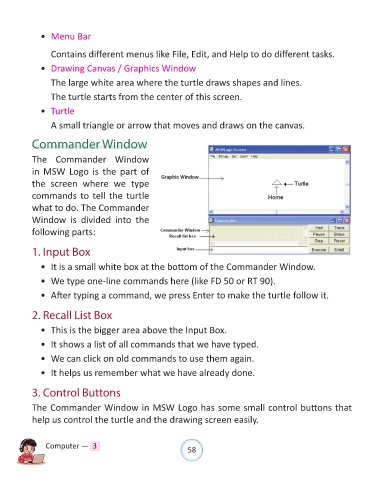
•  Menu Bar


                  Contains different menus like File, Edit, and Help to do different tasks.

              •  Drawing Canvas / Graphics Window

                  The large white area where the turtle draws shapes and lines.

                  The turtle starts from the center of this screen.

              •  Turtle

                  A small triangle or arrow that moves and draws on the canvas.


            Commander Window

            The Commander Window

            in  MSW Logo  is  the part of
            the  screen  where  we  type

            commands to tell the turtle
            what to do. The Commander

            Window is  divided  into  the
            following parts:


            1. Input Box

              •  It is a small white box at the bottom of the Commander Window.

              •  We type one-line commands here (like FD 50 or RT 90).

              •  After typing a command, we press Enter to make the turtle follow it.


            2. Recall List Box

              •  This is the bigger area above the Input Box.

              •  It shows a list of all commands that we have typed.

              •  We can click on old commands to use them again.

              •  It helps us remember what we have already done.


            3. Control Buttons

            The Commander Window in MSW Logo has some small control buttons that

            help us control the turtle and the drawing screen easily.


                Computer —  3                                   58

