


Page 69 - Digital_Kids_3
P. 69
Selecting Text


            Ways to select text:
              1.  Click and drag the cursor across the text.


              2.  Hold Shift + Arrow keys.
              3.  Double-click to select a word.


              4.  Triple-click to select a paragraph.
              5.  Press Ctrl + A to select the entire document.


            Shortcut keys for selection:
              •  Ctrl + A → Select the entire document.


              •  Ctrl + Click → Select a text line.
              •  Triple-click → Select a paragraph.


              •  Shift + End → Select till the end of a line.
              •  Shift + Home → Select from the start of a line.


            Deleting Text

              •  To delete a letter: Place the cursor left of the letter and press Delete.

              •  To delete a word: Select the word and press Delete.

              •  To delete a sentence/paragraph: Select and press Delete.


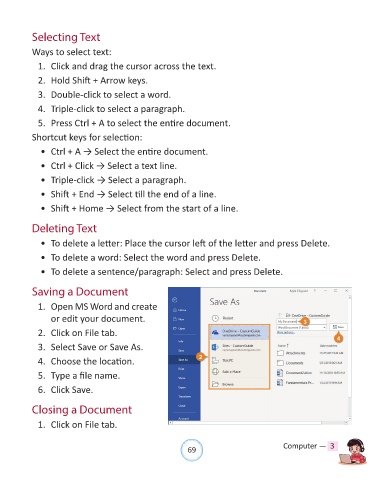
            Saving a Document

              1.  Open MS Word and create

                  or edit your document.

              2.  Click on File tab.

              3.  Select Save or Save As.

              4.  Choose the location.

              5.  Type a file name.

              6.  Click Save.


            Closing a Document

              1.  Click on File tab.


                                                                69                               Computer —  3

