


Page 70 - Digital_Kids_3
P. 70
2.  Select Close.

              3.  Your  document  will

                  be closed.


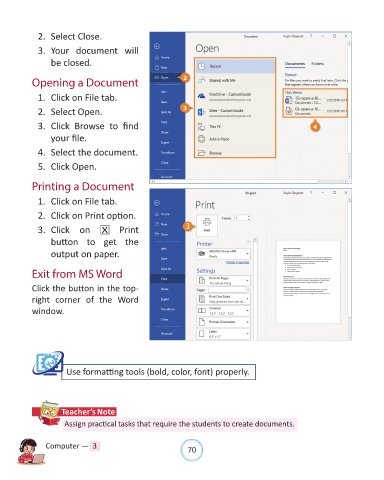
            Opening a Document

              1.  Click on File tab.

              2.  Select Open.

              3.  Click  Browse  to  find

                  your file.

              4.  Select the document.

              5.  Click Open.


            Printing a Document

              1.  Click on File tab.

              2.  Click on Print option.

              3.  Click  on            Print

                  button  to  get  the
                  output on paper.


            Exit from MS Word

            Click the button in the top-

            right corner  of the Word
            window.


                       Use formatting tools (bold, color, font) properly.


                      Teacher’s Note
                       Assign practical tasks that require the students to create documents.


                Computer —  3                                   70

