


Page 79 - Digital_Kids_5
P. 79
•  Communication: They provide a simple, universal way to explain complex ideas to
                  others, even if they aren't experts.


            Flowchart Symbols and Their Functions

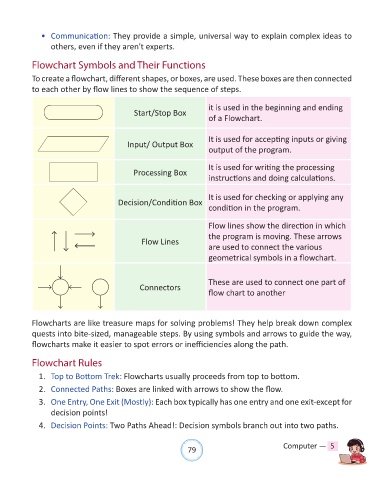
            To create a flowchart, different shapes, or boxes, are used. These boxes are then connected

            to each other by flow lines to show the sequence of steps.

                                                                       it is used in the beginning and ending
                                              Start/Stop Box
                                                                       of a Flowchart.


                                                                       It is used for accepting inputs or giving
                                            Input/ Output Box
                                                                       output of the program.


                                                                       It is used for writing the processing
                                              Processing Box
                                                                       instructions and doing calculations.


                                                                       It is used for checking or applying any
                                         Decision/Condition Box
                                                                       condition in the program.


                                                                       Flow lines show the direction in which
                                                                       the program is moving. These arrows
                                                 Flow Lines
                                                                       are used to connect the various
                                                                       geometrical symbols in a flowchart.


                                                                       These are used to connect one part of
                                                Connectors
                                                                       flow chart to another


            Flowcharts are like treasure maps for solving problems! They help break down complex
            quests into bite-sized, manageable steps. By using symbols and arrows to guide the way,
            flowcharts make it easier to spot errors or inefficiencies along the path.


            Flowchart Rules

              1.  Top to Bottom Trek: Flowcharts usually proceeds from top to bottom.

              2.  Connected Paths: Boxes are linked with arrows to show the flow.

              3.  One Entry, One Exit (Mostly): Each box typically has one entry and one exit-except for
                  decision points!
              4.  Decision Points: Two Paths Ahead!: Decision symbols branch out into two paths.


                                                                79                               Computer —  5

