


Page 55 - Digital_Kids_2
P. 55
2.  Click on the desired brush.

              3.  Click  on  any  color  from  the  color

                  palette.

              4.  Press  the  left  mouse  button  and

                  drag to make the drawing.


            Fill Tool

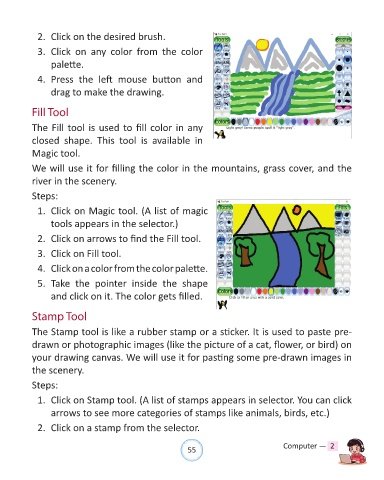
            The Fill tool is used to fill color in any

            closed  shape.  This  tool  is  available  in

            Magic tool.

            We will use it for filling the color in the mountains, grass cover, and the

            river in the scenery.

            Steps:

              1.  Click on Magic tool. (A list of magic

                  tools appears in the selector.)

              2.  Click on arrows to find the Fill tool.

              3.  Click on Fill tool.

              4.  Click on a color from the color palette.

              5.  Take  the  pointer  inside  the  shape

                  and click on it. The color gets filled.


            Stamp Tool

            The Stamp tool is like a rubber stamp or a sticker. It is used to paste pre-

            drawn or photographic images (like the picture of a cat, flower, or bird) on

            your drawing canvas. We will use it for pasting some pre-drawn images in
            the scenery.


            Steps:

              1.  Click on Stamp tool. (A list of stamps appears in selector. You can click

                  arrows to see more categories of stamps like animals, birds, etc.)

              2.  Click on a stamp from the selector.


                                                                55                               Computer —  2

