


Page 57 - Digital_Kids_2
P. 57
Two buttons help you decide:

              •  Left button = Click and drag

                                                                                             Tux Paint has won
              •  Right button = Single click                                                many awards for its

              5.  Repeat steps 2–4 to apply other effects.                                 innovative design and

                                                                                             educational value.
            Text Tool

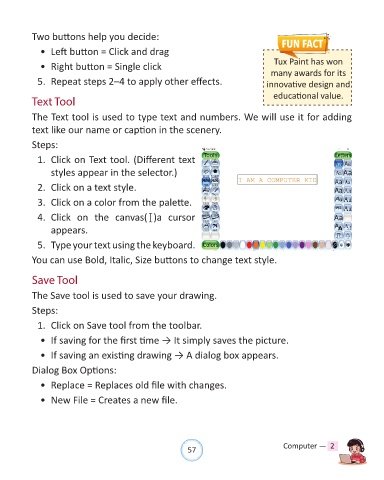
            The Text tool is used to type text and numbers. We will use it for adding

            text like our name or caption in the scenery.

            Steps:

              1.  Click on Text tool. (Different text

                  styles appear in the selector.)

              2.  Click on a text style.

              3.  Click on a color from the palette.

              4.  Click  on  the  canvas( )a  cursor

                  appears.

              5.  Type your text using the keyboard.

            You can use Bold, Italic, Size buttons to change text style.


            Save Tool

            The Save tool is used to save your drawing.

            Steps:

              1.  Click on Save tool from the toolbar.

              •  If saving for the first time → It simply saves the picture.

              •  If saving an existing drawing → A dialog box appears.

            Dialog Box Options:


              •  Replace = Replaces old file with changes.

              •  New File = Creates a new file.


                                                                57                               Computer —  2

