


Page 45 - Digital_Kids_2
P. 45
Tabs


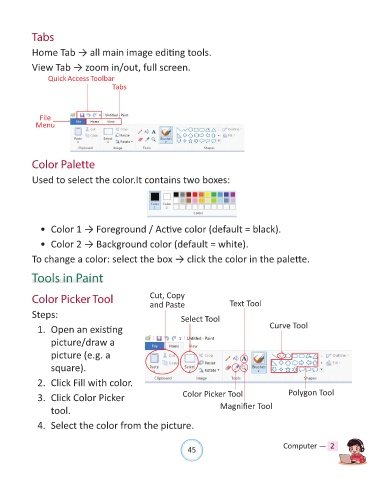
            Home Tab → all main image editing tools.

            View Tab → zoom in/out, full screen.
                 Quick Access Toolbar
                                       Tabs


              File
             Menu


            Color Palette

            Used to select the color.It contains two boxes:


              •  Color 1 → Foreground / Active color (default = black).

              •  Color 2 → Background color (default = white).

            To change a color: select the box → click the color in the palette.


            Tools in Paint


            Color Picker Tool                       Cut, Copy                  Text Tool
                                                    and Paste
            Steps:                                            Select Tool

              1.  Open an existing                                                          Curve Tool

                  picture/draw a
                  picture (e.g. a

                  square).

              2.  Click Fill with color.

              3.  Click Color Picker                           Color Picker Tool                  Polygon Tool

                  tool.                                                    Magnifier Tool

              4.  Select the color from the picture.


                                                                45                               Computer —  2

