


Page 25 - Digital_Kids_4
P. 25
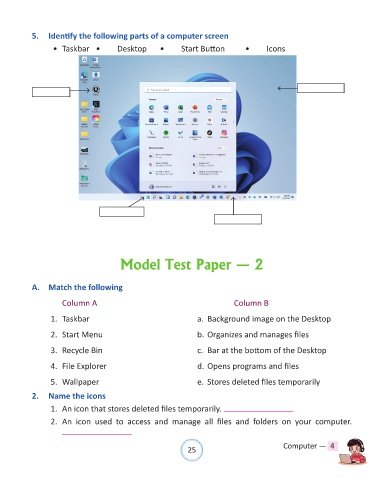
5.  Identify the following parts of a computer screen

                   •  Taskbar  •         Desktop       •      Start Button          •      Icons


                                          Model Test Paper — 2


            A.  Match the following


                      Column A                                                    Column B

                  1.  Taskbar                                       a.  Background image on the Desktop

                  2.  Start Menu                                    b. Organizes and manages files

                  3.  Recycle Bin                                   c.  Bar at the bottom of the Desktop


                  4.  File Explorer                                 d. Opens programs and files

                  5.  Wallpaper                                     e.  Stores deleted files temporarily

            2.  Name the icons

                  1.  An icon that stores deleted files temporarily.

                  2.  An  icon  used  to  access  and  manage  all  files  and  folders  on  your  computer.


                                                                25                               Computer —  4

