


Page 56 - Digital_Kids_4
P. 56
6                   Introduction to PowerPoint


                                   Chapter Outline
                                              •  Starting PowerPoint                 •  Saving a Presentation

                                              •  Components of Powerpoint            •  Closing a Presentation
                                              •  Title slide                         •  Running a slide show


            PowerPoint is an application software developed by Microsoft that
            allows you to create presentations. It could be a combination of
            multiple media such as audio, video, text, etc.

            One page of your presentation is called a slide, and a group of slides

            on any one topic is called a presentation.

            Through presentations, you can
            communicate ideas, messages,                        Play and Learn

            and  other  information  to  the              1.  I make your slides move from one to another
            viewers.                                          with style. Name me.                               .


            Starting PowerPoint

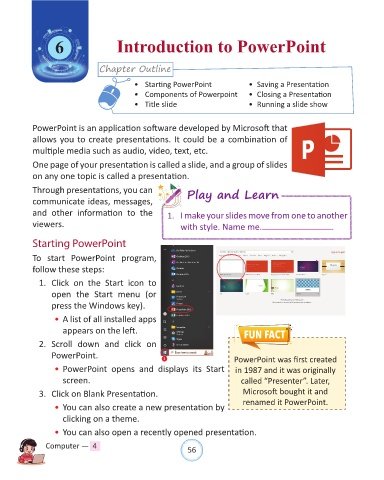
            To start  PowerPoint program,
            follow these steps:

              1.  Click  on  the  Start  icon  to

                  open  the Start menu  (or
                  press the Windows key).

                  • A list of all installed apps
                      appears on the left.

              2.  Scroll  down  and  click  on

                  PowerPoint.                           1                       PowerPoint was first created

                  • PowerPoint opens  and  displays its  Start  in 1987 and it was originally
                      screen.                                                     called “Presenter”. Later,

              3.  Click on Blank Presentation.                                     Microsoft bought it and
                  • You can also create a new presentation by                      renamed it PowerPoint.

                      clicking on a theme.

                  • You can also open a recently opened presentation.

                Computer —  4                                   56

