


Page 57 - Digital_Kids_4
P. 57
A blank presentation titled Presentation1 appears on your screen.


            PowerPoint Window

            With the help of several components present in the PowerPoint window, you can

            perform your tasks efficiently.

            Components of PowerPoint Window

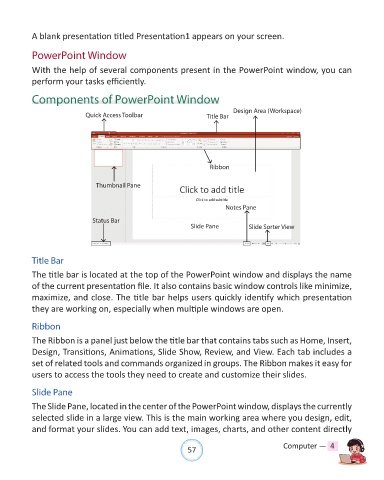
                                                                                Design Area (Workspace)
                              Quick Access Toolbar                     Title Bar


                                                                        Ribbon


                                 Thumbnail Pane


                                                                             Notes Pane

                                Status Bar
                                                                 Slide Pane          Slide Sorter View


            Title Bar
            The title bar is located at the top of the PowerPoint window and displays the name

            of the current presentation file. It also contains basic window controls like minimize,
            maximize, and close. The title bar helps users quickly identify which presentation

            they are working on, especially when multiple windows are open.


            Ribbon
            The Ribbon is a panel just below the title bar that contains tabs such as Home, Insert,

            Design, Transitions, Animations, Slide Show, Review, and View. Each tab includes a
            set of related tools and commands organized in groups. The Ribbon makes it easy for

            users to access the tools they need to create and customize their slides.


            Slide Pane
            The Slide Pane, located in the center of the PowerPoint window, displays the currently

            selected slide in a large view. This is the main working area where you design, edit,
            and format your slides. You can add text, images, charts, and other content directly


                                                                57                               Computer —  4

