


Page 89 - Digital_Kids_5
P. 89
Components of Powerpoint

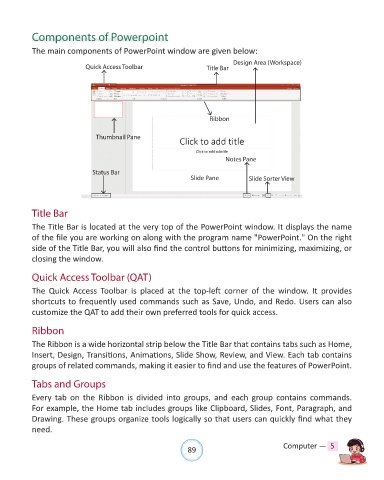
            The main components of PowerPoint window are given below:

                                                                                Design Area (Workspace)
                              Quick Access Toolbar                     Title Bar


                                                                        Ribbon


                                 Thumbnail Pane


                                                                             Notes Pane

                                Status Bar
                                                                 Slide Pane          Slide Sorter View


            Title Bar
            The Title Bar is located at the very top of the PowerPoint window. It displays the name

            of the file you are working on along with the program name "PowerPoint." On the right
            side of the Title Bar, you will also find the control buttons for minimizing, maximizing, or
            closing the window.


            Quick Access Toolbar (QAT)

            The  Quick  Access  Toolbar  is  placed  at  the  top-left  corner  of  the  window.  It  provides
            shortcuts to frequently used commands such as Save, Undo, and Redo. Users can also
            customize the QAT to add their own preferred tools for quick access.


            Ribbon

            The Ribbon is a wide horizontal strip below the Title Bar that contains tabs such as Home,

            Insert, Design, Transitions, Animations, Slide Show, Review, and View. Each tab contains
            groups of related commands, making it easier to find and use the features of PowerPoint.


            Tabs and Groups
            Every  tab  on  the  Ribbon  is  divided  into  groups,  and  each  group  contains  commands.

            For example, the Home tab includes groups like Clipboard, Slides, Font, Paragraph, and
            Drawing. These groups organize tools logically so that users can quickly find what they
            need.


                                                                89                               Computer —  5

