


Page 35 - Digital_Kids_2
P. 35
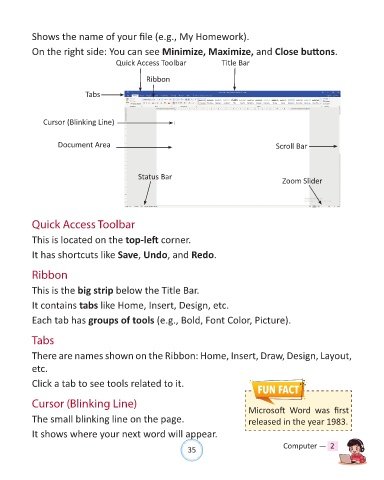
Shows the name of your file (e.g., My Homework).

            On the right side: You can see Minimize, Maximize, and Close buttons.

                                        Quick Access Toolbar                Title Bar


                                                  Ribbon

                              Tabs


                Cursor (Blinking Line)


                     Document Area                                                            Scroll Bar


                                                Status Bar                                      Zoom Slider


            Quick Access Toolbar

            This is located on the top-left corner.

            It has shortcuts like Save, Undo, and Redo.


            Ribbon


            This is the big strip below the Title Bar.

            It contains tabs like Home, Insert, Design, etc.

            Each tab has groups of tools (e.g., Bold, Font Color, Picture).


            Tabs


            There are names shown on the Ribbon: Home, Insert, Draw, Design, Layout,
            etc.

            Click a tab to see tools related to it.


            Cursor (Blinking Line)                                                   Microsoft  Word  was  first

            The small blinking line on the page.                                     released in the year 1983.

            It shows where your next word will appear.


                                                                35                               Computer —  2

