


Page 66 - Digital_Kids_4
P. 66
7                  More Features of Word 2021


                                   Chapter Outline

                                              •  Starting MS Word                   •  Cut and Paste Command
                                              •  Components of MS Word              •  Formating the text
                                              •  Working in MS Word  •  Making Text- Bold, Italic, Underline
                                              •  Undo and Redo Commands             •  Aligning Text
                                              •  Checking Spelling and Grammar • Bullets and Numbered list


            Microsoft Word or Word is one of the most popular word processing programs, which

            is used for creating, formatting, editing, and saving a document. It also provides
            different  features  such  as  Inserting  and  Deleting  Text,  Spelling  and  Grammar,

            Thesaurus, Find and Replace, Bullets and Numbering, Inserting Images, etc.


            Starting MS Word
              1.  Click the Start button (Windows icon) on the taskbar.

              2.  Scroll through the list of applications or type Word in the search bar.

              3.  Click on Word or Word 2021 from the results.


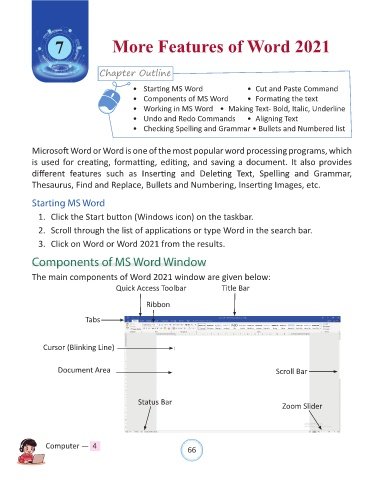
            Components of MS Word Window

            The main components of Word 2021 window are given below:

                                        Quick Access Toolbar                Title Bar

                                                  Ribbon

                              Tabs


                Cursor (Blinking Line)


                     Document Area                                                            Scroll Bar


                                                Status Bar                                      Zoom Slider


                Computer —  4                                   66

