


Page 70 - Digital_Kids_4
P. 70
undone using the Undo command. It restores the changes that were reversed.

            Shortcut key: Ctrl + Y


            Formatting the Text

            Formatting means changing the style, colour, and size of the text.


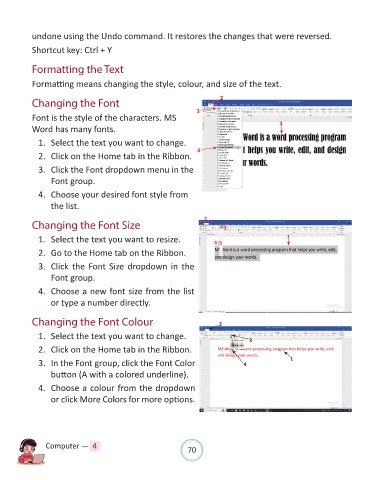
            Changing the Font                                              2
                                                                   3
            Font is the style of the characters. MS

            Word has many fonts.                                                               1

              1.  Select the text you want to change.

              2.  Click on the Home tab in the Ribbon.              4
              3.  Click the Font dropdown menu in the

                  Font group.

              4.  Choose your desired font style from
                  the list.

                                                                      2
            Changing the Font Size                                           3

              1.  Select the text you want to resize.                    4                        1

              2.  Go to the Home tab on the Ribbon.

              3.  Click the Font Size dropdown in the
                  Font group.

              4.  Choose a new font size from the list
                  or type a number directly.


            Changing the Font Colour                                       2


              1.  Select the text you want to change.                                3
              2.  Click on the Home tab in the Ribbon.

              3.  In the Font group, click the Font Color                          4               1

                  button (A with a colored underline).
              4.  Choose a colour from the dropdown

                  or click More Colors for more options.


                Computer —  4                                   70

