


Page 77 - Digital_Kids_4
P. 77
8                         Introduction to Scratch


                                   Chapter Outline
                                             •  Starting Scratch Program  • Dragging and Dropping the Blocks

                                             •  Components of Scratch Window  • Movement of sprite
                                             •  Saving, Opening, and Exiting Scratch
                                             •  Scratch program to draw a square

            Scratch is a simple, fun-based visual programming language designed by the Lifelong

            Kindergarten  Group  at  MIT  (Massachusetts  Institute  of  Technology)  to  introduce
            some basic programming concepts in an interactive manner.

            Scratch is fairly easy for anyone to learn with fun. All commands are on the screen,
            so you can just drag and drop them. It also includes graphics and sounds and enables

            you to quickly see results of your work.


            Starting Scratch Program
            To open Scratch, follow the given steps:
                                                                               Scratch 3.0 was released on
              1.  Click on the Start button.                                January 2, 2019, and it allows you

              2.  Click on Scratch 3.                                         to create projects not only on


            Components of Scratch Window                                      computers but also on tablets!

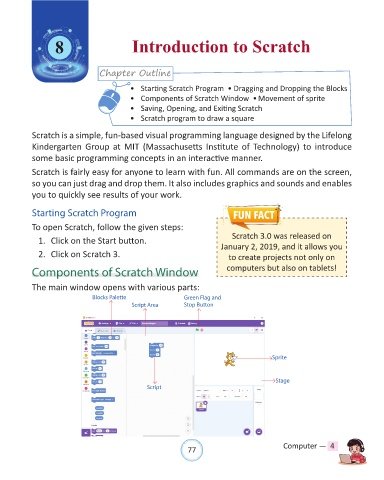
            The main window opens with various parts:

                                Blocks Palette                 Green Flag and
                                             Script Area       Stop Button


                                                                                             Sprite


                                                                                              Stage
                                                   Script


                                                                77                               Computer —  4

