


Page 61 - Digital_Kids_5
P. 61
6                            Coding With Scratch


                                   Chapter Outline
                                                  Starting Scratch 3.0                Components of Scratch
                                                  Coordinates and Directions
                                                  Blocks


            Scratch

            A scratch is a programming language used to create interactive stories, animations, games,
            music and art. It provides a graphical environment which makes it easy and interesting to
            use. Scratch is freely available on the website https://scratch.mit.edu/download. We can

            install the Scratch 3.0 editor to work on projects without an internet connection.

            Starting Scratch 3.0

            To start Scratch, follow the steps given below.

            Step 1: Click the Start button and scroll down to the letter S.

            Step 2: Select Scratch 3 from the list of available programs. The Scratch 3 Offline Editor
            window appears.

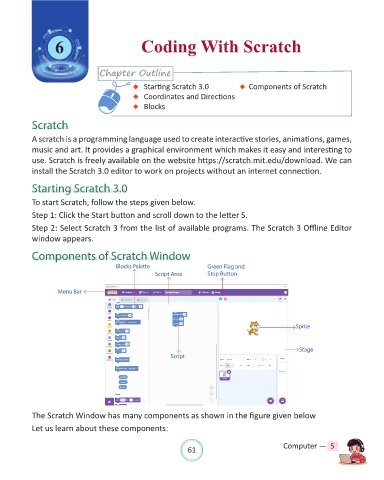
            Components of Scratch Window

                                        Blocks Palette                 Green Flag and
                                                     Script Area       Stop Button


                     Menu Bar


                                                                                                     Sprite


                                                                                                      Stage
                                                           Script


            The Scratch Window has many components as shown in the figure given below

            Let us learn about these components:


                                                                61                               Computer —  5

