


Page 63 - Digital_Kids_5
P. 63
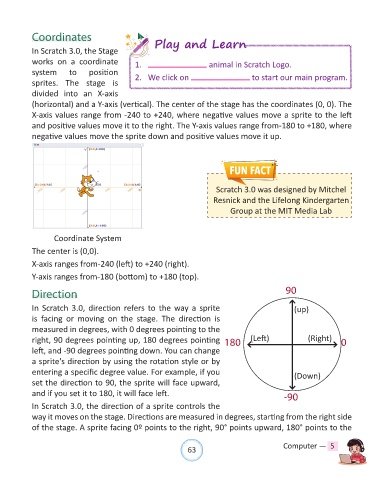
Coordinates

            In Scratch 3.0, the Stage                Play and Learn

            works  on  a  coordinate           1.                       animal in Scratch Logo.
            system      to     position        2.  We click on                        to start our main program.
            sprites.  The  stage  is
            divided  into  an  X-axis

            (horizontal) and a Y-axis (vertical). The center of the stage has the coordinates (0, 0). The
            X-axis values range from -240 to +240, where negative values move a sprite to the left
            and positive values move it to the right. The Y-axis values range from-180 to +180, where
            negative values move the sprite down and positive values move it up.


                                                                          Scratch 3.0 was designed by Mitchel
                                                                         Resnick and the Lifelong Kindergarten
                                                                               Group at the MIT Media Lab


                       Coordinate System

            The center is (0,0).
            X-axis ranges from-240 (left) to +240 (right).

            Y-axis ranges from-180 (bottom) to +180 (top).

            Direction                                                                            90


            In Scratch 3.0, direction refers to the way a sprite                                    (up)
            is  facing  or  moving  on  the  stage.  The  direction  is
            measured in degrees, with 0 degrees pointing to the
            right, 90 degrees pointing up, 180 degrees pointing              180      (Left)             (Right)    0

            left, and -90 degrees pointing down. You can change
            a sprite's direction by using the rotation style or by
            entering a specific degree value. For example, if you                                   (Down)
            set the direction to 90, the sprite will face upward,

            and if you set it to 180, it will face left.                                         -90
            In Scratch 3.0, the direction of a sprite controls the

            way it moves on the stage. Directions are measured in degrees, starting from the right side
            of the stage. A sprite facing 0º points to the right, 90° points upward, 180° points to the


                                                                63                               Computer —  5

