


Page 67 - Digital_Kids_5
P. 67
3.  Drag the Move block from the Motion category and place it under the say Hello!
                  block. Change the value from 10 to 50.

              4.  Drag the say Hello! for 2 sec block into the Script area. Change the text from "Hello!"
                  to "This is fantastic!" and the time value from 2 to 30.

              5.  Click on the Green Flag button to run the script.


            Pen Block

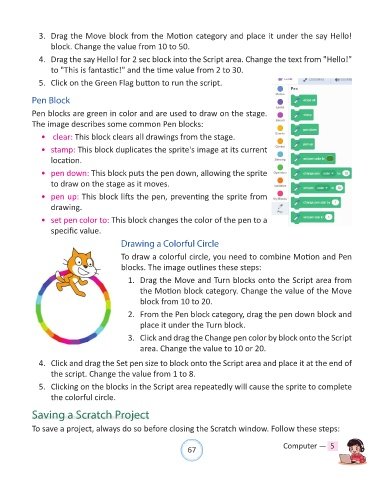
            Pen blocks are green in color and are used to draw on the stage.
            The image describes some common Pen blocks:

              •   clear: This block clears all drawings from the stage.
              •  stamp: This block duplicates the sprite's image at its current
                  location.

              •  pen down: This block puts the pen down, allowing the sprite
                  to draw on the stage as it moves.

              •  pen up: This block lifts the pen, preventing the sprite from
                  drawing.

              •  set pen color to: This block changes the color of the pen to a
                  specific value.

                                          Drawing a Colorful Circle

                                          To draw a colorful circle, you need to combine Motion and Pen
                                          blocks. The image outlines these steps:

                                            1.  Drag the Move and Turn blocks onto the Script area from
                                                the Motion block category. Change the value of the Move
                                                block from 10 to 20.

                                            2.  From the Pen block category, drag the pen down block and
                                                place it under the Turn block.

                                            3.  Click and drag the Change pen color by block onto the Script
                                                area. Change the value to 10 or 20.

              4.  Click and drag the Set pen size to block onto the Script area and place it at the end of

                  the script. Change the value from 1 to 8.
              5.  Clicking on the blocks in the Script area repeatedly will cause the sprite to complete
                  the colorful circle.


            Saving a Scratch Project

            To save a project, always do so before closing the Scratch window. Follow these steps:


                                                                67                               Computer —  5

